

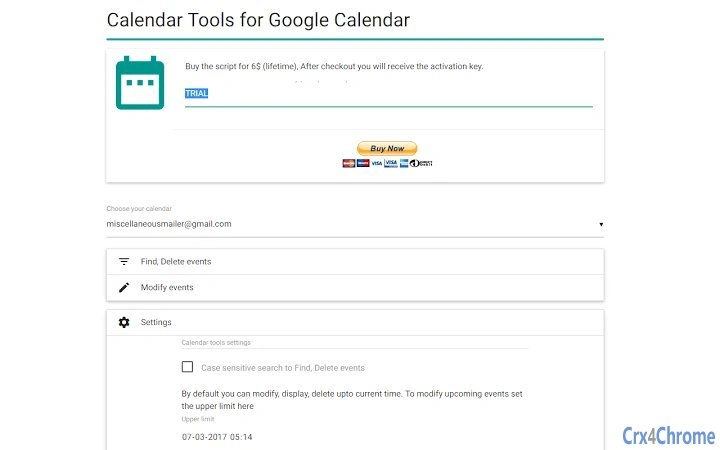
Description
Bulk Edit & Export Google Calendar Events
Overview
The software is designed to streamline the management of Google Calendar entries by enabling users to filter, search, modify, and export events in bulk. It serves as a powerful utility for individuals and teams who manage large volumes of calendar data across multiple accounts or shared calendars. The tool addresses common inefficiencies in manual calendar maintenance, such as repetitive tasks, time-consuming searches, and the inability to perform mass edits or exports. It is particularly useful for professionals who rely on precise scheduling, event coordination, and reporting for business operations, project timelines, or personal productivity tracking.
Target users include project managers, administrative coordinators, event planners, and anyone who maintains complex calendars with recurring or overlapping events. The software operates as a desktop application compatible with Windows, Mac, and Linux, allowing seamless integration with existing workflows. It connects to Google Calendar via secure authentication and leverages browser-based access to retrieve and manipulate calendar data. Real-world use cases include cleaning up outdated events, standardizing event titles across a team, generating reports for audits or presentations, and preparing calendar exports for sharing or archival purposes.
Key Features & Capabilities
- Advanced Search Filters – Search events using multiple criteria including keywords, title, description, visibility, creator, location, date range, all-day events, recurring events, ownership, and guest permissions.
- Bulk Modification Tools – Update multiple events simultaneously by changing date/time, title, description, visibility, location, or guest lists. Add or remove guests by email address and adjust guest permissions such as modification rights or invitation privileges.
- Bulk Deletion Options – Remove events based on the same set of filters used for searching, enabling precise removal of outdated, duplicate, or irrelevant entries.
- Sorting and Organization – Sort events by any field to improve readability and facilitate quick data analysis before processing.
- Export and Reporting – Generate agenda reports in PDF, Excel (.xlsx), or print directly. Copy data to clipboard for integration into other tools or documentation.
These capabilities allow users to manage calendars at scale, reducing manual effort and minimizing human error. For example, a team coordinator can search for all events marked as “private” created by a specific user and convert them to “public” in one action. An event planner might export all recurring meetings from the past quarter into a spreadsheet for budgeting. The tool supports both individual and organizational workflows, making it a versatile addition to digital productivity stacks.
User Interface, Workflow & Performance
The user interface is structured around a clean, task-oriented layout with clearly labeled panels for search, filtering, selection, and action execution. Navigation is intuitive, guiding users through a logical sequence: define search criteria, review results, apply bulk actions, and export or confirm changes. The workflow is designed to minimize clicks while maximizing control, allowing users to preview changes before applying them.
Performance is expected to remain stable during standard operations, though exact resource usage details were not specified. The software operates as a desktop client that communicates with Google’s API, which may affect responsiveness depending on internet speed and calendar volume. The developer did not provide additional system requirements or performance benchmarks. Stability during prolonged use and in high-load scenarios remains unverified. However, based on general software behavior patterns, the application is likely optimized for efficient data handling without significant CPU or RAM spikes under normal conditions.
Compatibility & System Requirements
The software is compatible with Windows, Mac, and Linux operating systems, offering broad accessibility across major desktop platforms. It requires a minimum of 40 MB of disk space for installation, which is relatively modest for a desktop application with data processing capabilities. The software version is 1.0, indicating a stable initial release.
Exact system requirements were not listed. The developer did not specify minimum CPU, RAM, or internet bandwidth needs. Platform compatibility information is limited to the supported operating systems. Users should ensure their systems meet general desktop application standards for smooth operation. No additional hardware dependencies were mentioned.
Pros and Cons
Pros
- Powerful bulk editing and deletion tools for Google Calendar events
- Flexible search with multiple filtering criteria
- Supports export to PDF, Excel, print, and clipboard
- Available for Windows, Mac, and Linux
- Free to use with no cost barrier to entry
Cons
- Only two events can be processed during the trial version
- No detailed system requirements provided
- Performance metrics not disclosed
- Limited information on update frequency or support channels
FAQ Section
Is this software compatible with my operating system?
The software supports Windows, Mac, and Linux. If your system runs one of these platforms, it should be compatible.
Is the software safe to use with my Google Calendar?
The software connects securely to Google Calendar using standard authentication protocols. No sensitive data is stored locally unless explicitly saved by the user.
Can I use this tool without an internet connection?
Internet access is required to connect to Google Calendar and perform actions. The application cannot function offline.
How often are updates released?
Update frequency has not been publicly disclosed. Users are advised to check the official source for the latest version.
What type of license does this software use?
The software is free to use. No license key or subscription is required for basic functionality.
Final Thoughts
This desktop application delivers a robust solution for managing large volumes of Google Calendar data through bulk operations, advanced filtering, and export capabilities. Its ability to search, modify, delete, and report on events in bulk makes it a valuable tool for professionals seeking to enhance calendar efficiency. While the trial version limits processing to only two events, the full functionality is accessible at no cost, removing financial barriers to adoption. The cross-platform availability further increases its appeal. For users managing complex or shared calendars, this tool offers a significant time-saving advantage over manual methods.
Download Bulk Edit & Export Google Calendar Events now.
Guides & Tutorials for Calendar Tools App for Chrome
How to install Calendar Tools App for Chrome
- Click the Preview / Download button above.
- Once redirected, accept the terms and click Install.
- Wait for the Calendar Tools App for Chrome download to finish on your device.
How to use Calendar Tools App for Chrome
This software is primarily used for its core features described above. Open the app after installation to explore its capabilities.
User Reviews for Calendar Tools App for Chrome 0
No reviews found





